Agendas and eventsPremium and up
The rundown you run is the agenda everyone reads
Each room's rundown is also its agenda, and an event puts a conference's rooms together: a board for the crew, an agenda for the foyer screens, and a page for attendees' phones. They follow the rooms live, so when a session runs late, the times shown for it and for the sessions after it move.
Every room
Every room has a live agenda, on every plan
A room's own agenda is the screen by its door: the day's sessions in order, each at its projected or scheduled start, with its title, its speaker, and its length, such as "45 min" or "1 h 30 min". The session on now has a progress bar and no countdown, the next is marked Next, and finished ones turn muted.
The session on now and the next one say how far they are from their scheduled start, such as "running 4 min late" or "4 min ahead", and the times come from the projected schedule, so they move with the room. A paused session says Paused. Notes and labels never appear on it.
Open it from the Agenda card in the room's Share a screen. Its text is sized to the screen's width, so on a TV it spans the screen.

An event
Put a conference's rooms together in an event
On Premium and up, an admin creates an event on the Rooms page with a name and its first and last days, 30 days at most, counting both ends. In the event's Settings, they tick the rooms that belong to it, 20 at most, in the order the board shows them. A room belongs to at most one event.
The event takes the time zone of the browser it is created in, and its board and agenda show every time in that zone, in 24-hour form. The Rooms page then groups the rooms under their event's name and dates.
The Settings hold the event's links: its attendee page first, then the board and the agenda under For the screens and the crew, each with its QR code and a copy button, and then the event's own screen theme.

The board
A board of every room, side by side, for the crew
The board shows one day across every room of the event, for the production office, the stage manager, or a monitor backstage. Each room is a column, in the event's order, headed by what is on now, what is paused, or what is next. A room with nothing planned that day is left out of it.
An upcoming session is at its projected start, and a running or paused one shows when it actually started. While a session runs or is paused, its length gives way to the time remaining, with a progress bar, both on the speaker's clock when the timer is warped; once it is over time the bar stays full and the length returns, so the board never shows a negative time.
An event of more than one day has day tabs along the top. The board opens on today when today is one of the event's days, and on the first day when it is not; a date added to its link pins a screen to one day, and a date that is not one of the event's days is ignored. The link is public: anyone who has it can watch, with no account.

The event agenda
The day in time slots, for the foyer screens
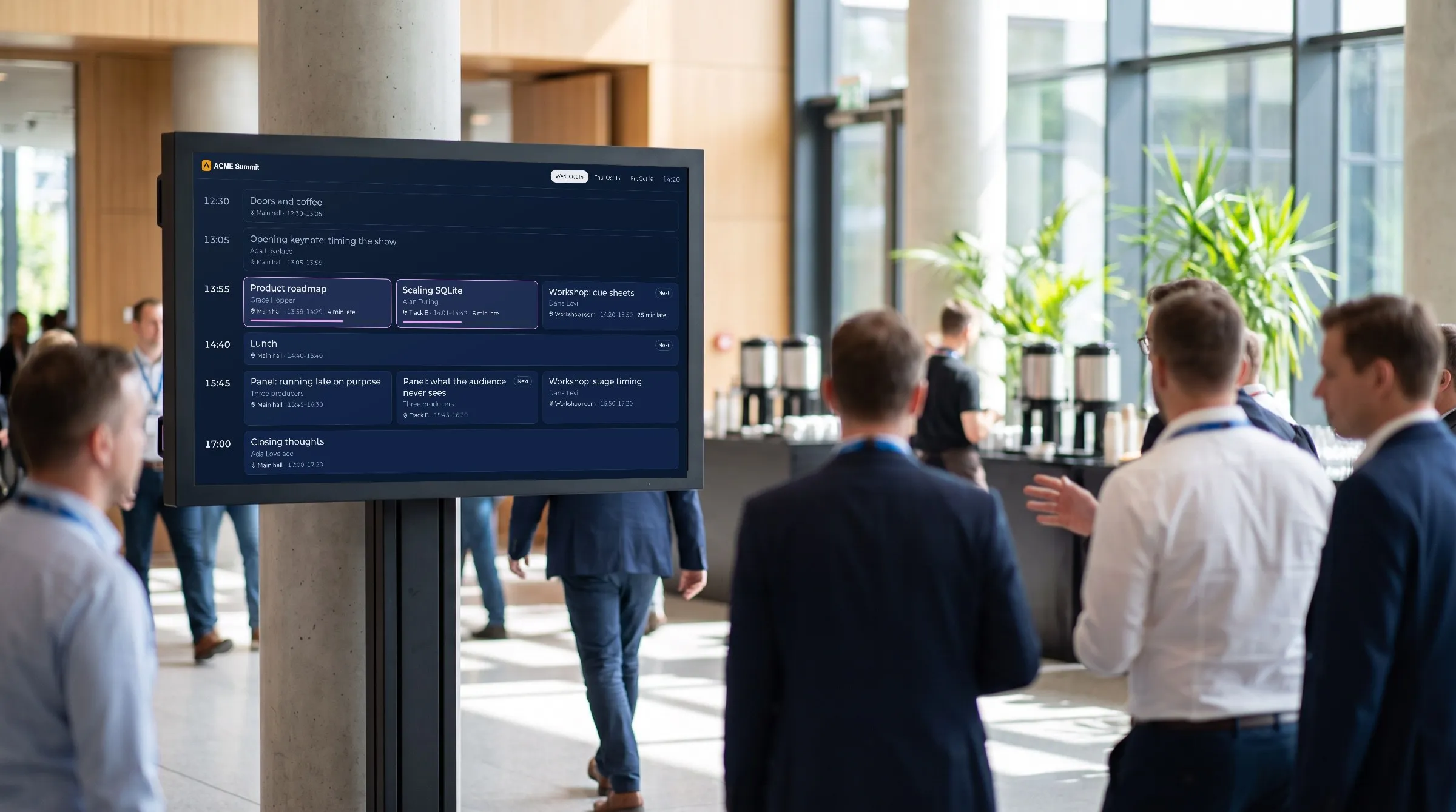
The event agenda lays the day out the way a printed programme reads, as rows of time slots. A session that starts alone spans the width, and sessions that start together, in different rooms, sit side by side in one row.
A session stays in the slot of its printed start, so a room that is behind keeps its row, and only the times inside its blocks move. The session on now, and the next session in each room, say "N min late" once they are a minute or more behind. The session on now has an outline and a progress bar, the next in each room is marked Next, and there is no countdown and no line for the current time.
Its text is sized to the screen's width, so a wall in the foyer reads from across the room. It is a screen for the foyer and lobby screens and for the crew, not a link to send to attendees: they have a page of their own.

Backstage
A backstage board for the green room
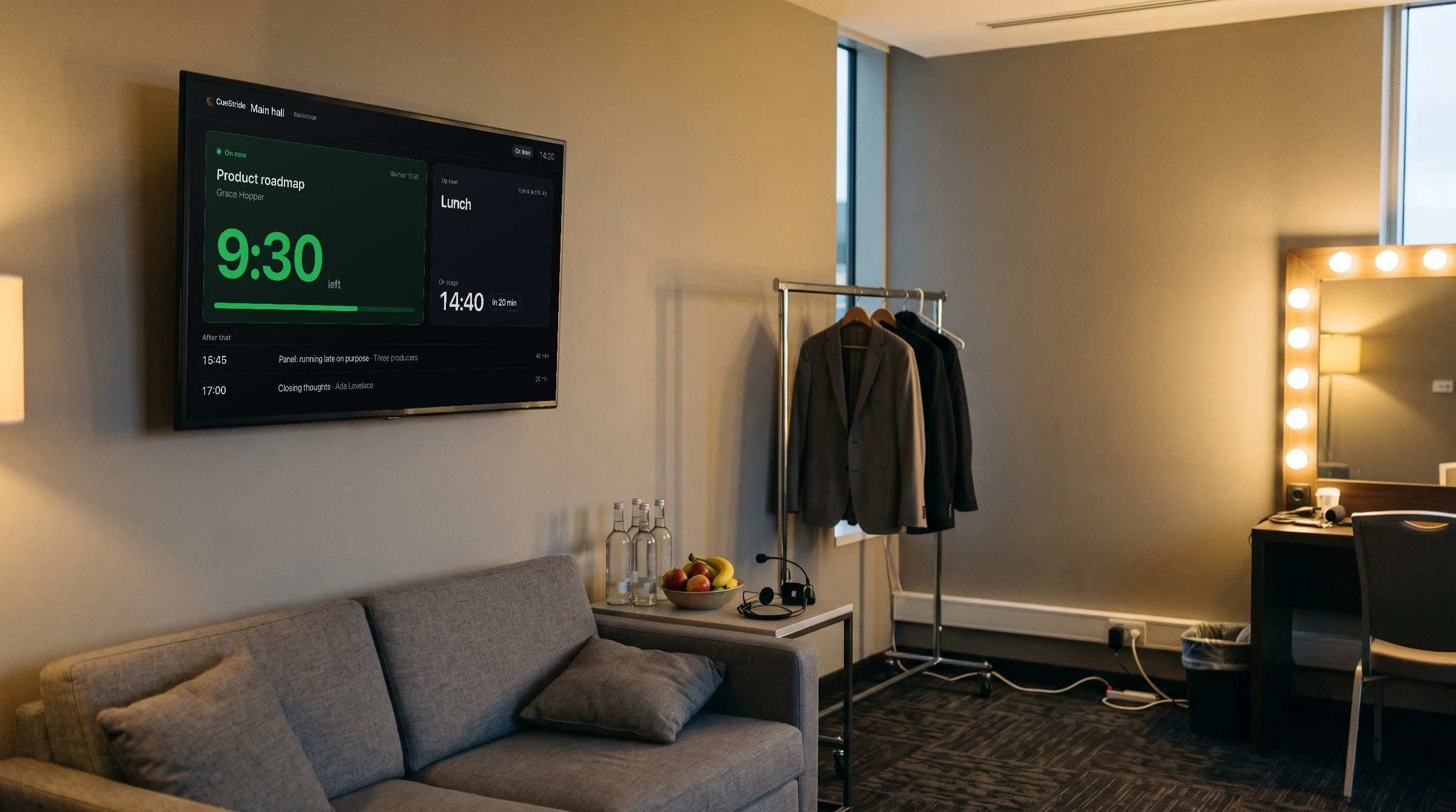
On Pro and up, every room also has a backstage board, for the people behind the stage: who is on now, with their real time left, or how long they have run over, and a bar, who is up next and when they go on, as a clock with the minutes until it, such as "in 6 min" or "in under a minute". While the session on now is over time, it says When this one ends unless a printed start is still a minute or more ahead, and when nothing will start the next session on its own, When the operator starts it. The two sessions after that follow, and a start that has moved by a minute or more shows its printed start beside it.
A line in its header says On time, Running N min late, or N min ahead, and is left out when there is nothing to compare. The board is read-only and always dark, it has no yellow or red, and no message, note, or label reaches it.
Open it from the Backstage card in the room's Share a screen, and put its link on any browser in the green room or the wings.
On phones
A page of the day for every attendee's phone
On Premium and up, each event has an attendee page, which attendees open from a link or a QR code you hand out: on the badges, in the welcome email, and on the slides between sessions. It needs no app, no sign-in, and no password.
It shows the event's days and every room's sessions in time slots, with a chip to follow one room. The session on now is marked On now, or Paused, with a bar of how far it is; the next is marked Next; and a session running a minute or more late says how late. There are no countdown digits: the speaker's timer is for the stage. The event's sponsors follow, by tier (Premium and up).
It asks for changes once a minute while it is on screen, and at once when someone comes back to it, so a phone in a pocket asks nothing. It never takes a room's screens.

How many
See how many are reading, and add more
Each event counts the phones reading its attendee page now, and a phone that stops checking in leaves the count. How many can read at once, on each event: 150 on Premium, or up to 9,900 with packs of 150; 20,000 on Enterprise.
The event's Settings show the count against the cap with a bar. Its heading on the Rooms page shows it too, amber as it nears the cap and red at it, with a notice that names the event. When an event is full, a new phone sees "Lots of people are reading the agenda right now" and tries again on its own until someone leaves; a phone already reading carries on.
While more can be bought, Add attendees opens your plan in Account settings, where the Attendees per event stepper moves a pack at a time. Every pack raises every event of the account at once, and going down is never refused.

Import
Bring the whole programme in from a spreadsheet
If the programme lives in a spreadsheet, import it into the event (Premium and up): one row per session, with its day, its room, its length, its title, and, when it has them, its start and its speaker, saved as CSV from Excel, Google Sheets, or Numbers. CueStride creates the rooms it names, puts them in the event, and adds a timer for every session on its day.
Preview says how many sessions, over how many days, in how many rooms, and lists each room as an existing room or a new room, before anything is made. If any row has a mistake, nothing is created, and the dialog lists every problem with its line number.
A row with a start becomes a timer that starts itself at that time, and one without waits for the host. A session whose start passed within the last day keeps its printed time but waits for you to start it, so importing during an event never puts a room live before anyone has its controller open; a start more than a day past is kept without its time. Import only adds: it never changes or removes a timer, so importing the same sheet twice adds the sessions again, until the room reaches its limit of timers and the rest are skipped.

Plans
Which plan has it
Events and agendas: Premium and up
Events, the board, the event agenda, and programme import are on Premium and up, and the attendee page on Premium and up. Only an account's admins manage events.
A room's own agenda is on every plan, and the backstage board on Pro and up.
On other plans, the Events section of the Rooms page says what events do and links to the plans. An account whose plan drops keeps its events, and the board and the agenda come back when it upgrades.
Set it up
How to set up events and agendas
- 1
Create the event
Signed in as an admin, open the Rooms page, and under Events type its name, choose its first and last days, and choose Create event.
- 2
Add its rooms
On the event's heading, choose Settings and tick its rooms in the board's order, or choose Import programme to make them from a spreadsheet.
- 3
Put the board and the agenda on screens
Copy the board link and the agenda link from the event's Settings, and open them on the crew's devices and the foyer screens.
- 4
Hand out the attendee page
Put its QR code or its link, from For attendees in the same Settings, on the badges, in the welcome email, and on the slides between sessions.
FAQ
Questions, answered.
Do attendees need an app or an account?
No. The attendee page opens from a link or a QR code, with no app, no sign-in, and no password. The board and the agendas need no account either.
What happens to the agendas when a session runs late?
Their times move. The agendas and the board put the coming sessions at their projected starts, worked out from the rooms as they really run, so when a session runs late, the sessions after it move with it, and the agendas say how late a room is running.
Can I send the event agenda's link to attendees?
Hand them the attendee page instead. The event agenda is a screen for the foyer and lobby screens and for the crew, and each one open counts as a screen in every room of the event. The attendee page is made for phones, and counts no screen.
Do the board and the event agenda count against a room's screens?
Yes. An open board, and an open event agenda, each take one of the screens of every room of the event. If any of those rooms is full, the screen names the room instead of the day, and tries again every 30 seconds.
How many rooms and days can an event have?
Up to 20 rooms, over up to 30 days counting both ends. A room belongs to at most one event.
What goes in the spreadsheet?
One row per session, under a first row that names the columns. Day, room, length, and title are required; start and speaker are optional. A day reads as 2026-09-21, or day first as 21/09/2026 or 21.09.2026. Month-first dates are not read: 03/04/2026 is 3 April, and 09/21/2026 is refused, so 2026-09-21 is the safe one.
Does the backstage board show the speaker's messages?
No. No message, note, or label reaches it, and it shows no yellow or red: it says in words how late the room runs.
How many attendees can read the attendee page at once?
On each event: 150 on Premium, or up to 9,900 with packs of 150; 20,000 on Enterprise. When an event is full, a new phone waits and tries again on its own; a phone already reading carries on.
Your next show, on time.
Put a room's link on a screen and run the show; sign up free when you want to keep it.
No account needed