SpeakersPro and up
Every speaker knows when they are on, and so does the green room
Speakers ask the same question all day: when am I on? With CueStride, each one has a private page that answers it, and the answer moves when a room runs late. Your crew sees their photo beside their name, and the moderator has the words to introduce them. The green room sees when to fetch each one. Speakers are on Pro and up.
One list
Each speaker once, for every room
Speakers, in the account's header, lists everyone who speaks at your events. Add a name once, and pick it for any session in a room you opened from your account.
In a session's timer dialog, pick the speakers in the order they speak. Their names fill the speaker line on the screens, and you can still type over it.
Rename someone, and each session that still shows their name as you picked it takes the new name. A line typed over stays as it was. An import picks a speaker when a cell is exactly one speaker's name, in any case. A name two speakers share stays text.

Their own page
A link that tells a speaker when to be ready
Each speaker gets a private link, as text or a QR code. CueStride never emails your speakers, so you send it the way you already reach them.
The page lists their sessions across your rooms. Each shows its expected start, its printed start, and how late or ahead the room runs. A session still to come says when to be ready, while its room has a call time for it. The page needs no account and no password.
Sent a link to the wrong person? Make a new one, and the old link stops working at once.

Photos and cards
Faces beside the names, and the words to introduce them
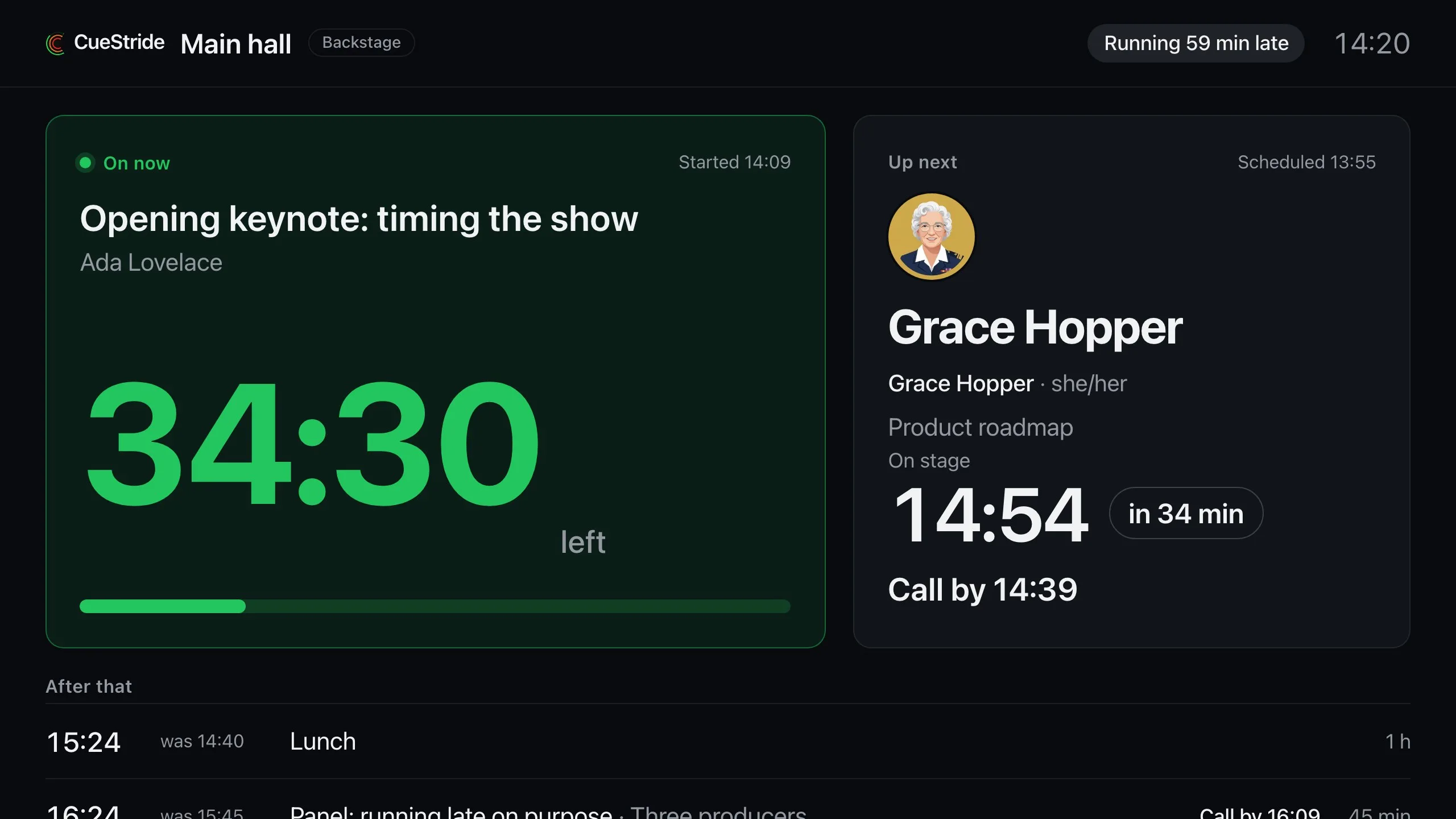
Only the speaker adds a photo, from their own page, and sending it is their consent. It shows beside their name on the agendas, the attendee page, the backstage board's next session, and your rundown. It never shows on the stage Timer.
A speaker card holds an intro line, how to say their name, their pronouns, and when they take questions. You write it, and the speaker can correct it.
- The moderator page shows the cards for the session on now and the one next.
- The backstage boards show only the pronunciation and the pronouns, on the next session.
- No card reaches the stage, the agendas, the attendee page, or an API key.

The green room
Know when to fetch the next speakers
Each room has a lead time, 15 minutes to start. A session's call time is its expected start less that lead, so it moves when the room runs late or ahead.
The backstage board shows Call by on the next session and the two after it, then Call now once that time passes. The event's board shows it on each room's next three sessions, and the moderator page under Up next. The speaker's own page says Be ready by, then Be ready now.
A session gets no call time when it names nobody, or while its start waits on the operator. With the lead off, no session has one.
Change the lead, or turn it off, in the room's settings.
For the backstage board and the event's board: see Events and agendas.

Plans
Which plan has it
Speakers: Pro and up
Speakers are on Pro and up. Changing a room's call time needs the backstage board, on Pro and up.
If a plan changes to one without speakers, the list stays. Names can still be deleted and photos removed, and a card can only be cleared. Adding, renaming, picking, and links stop. Speakers' pages close, though a speaker can still remove their photo and clear their card.
Set it up
How to set up speakers
- 1
Add your speakers
Choose Speakers in the account's header, type a name, and choose Add speaker.
- 2
Pick them for each session
In a session's timer dialog, under Speakers from your list, add each speaker in order.
- 3
Send each one their link
Choose Link on a speaker's row, then copy it or let them scan its QR code.
- 4
Open the backstage board in the green room
Its Call by tells the crew when to collect each speaker.
FAQ
Questions, answered.
Does CueStride email my speakers?
No. You send each speaker their link yourself, by email, chat, or a QR code.
Do speakers need an account?
No. Their page opens from its link, with no account and no password. It never counts as one of a room's screens.
Can I add a speaker's photo for them?
No. Only the speaker adds a photo, from their own page, and sending it is their consent. You can remove a wrong or unsuitable one.
Who sees the speaker card?
The moderator page and the controller show all of it, and the speaker sees their own. The backstage boards show only the pronunciation and the pronouns, on the next session.
What if I sent a link to the wrong person?
Choose New link on the speaker's row. The old link stops working at once, so send the new one.
Can I turn call times off?
Yes. In the room's settings, set Call speakers to Off.
Your next show, on time.
Put a room's link on a screen and run the show; sign up free when you want to keep it.
No account needed